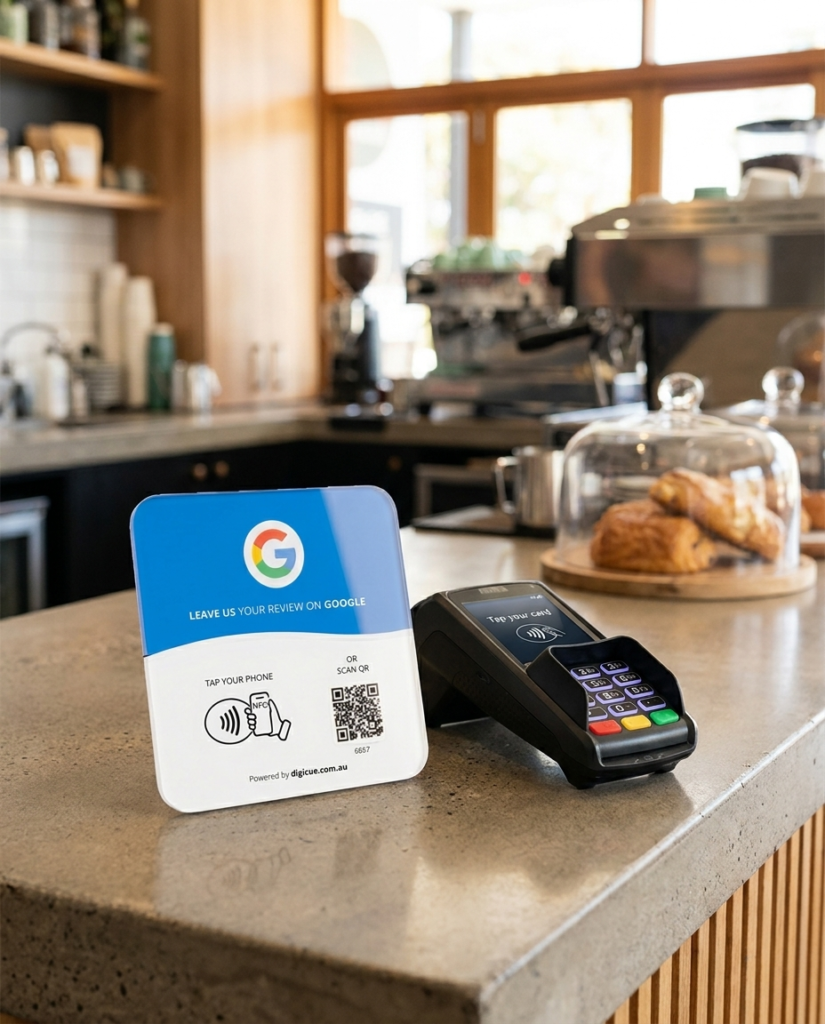
Two product families, one simple system. You buy here on Digicue Scan, activate on the Customer Portal, and the product does its job on your counter every day.
1. Digicue Scan
This website. Learn, compare and buy. Your order and payment finish here.
2. Customer Portal (Tap)
Activate products, set destinations, build your Connect Hub and view analytics.
3. Your counter
The product lives where customers finish up, working without apps or training.
Google Review products
Buy. Activate. Tap. Review.
Buy
Order on this site. Guest checkout, done in minutes.
Activate
On the Customer Portal: enter the code and add your Google review link.
Tap
Customers tap their phone or scan the QR code at your counter.
Review
Your Google review page opens and the review gets written.
The wider Digicue family
Buy. Activate. Place. Tap or scan.
Buy
Order any Digicue product on this site.
Activate
Self-serve on the Customer Portal with the code on the product.
Place
Counter, reception, table or pocket: wherever customers meet you.
Tap or scan
NFC tap on modern phones, QR scan on everything else.
Google Review products open the business’s Google review page.
Connect products open the business’s customised Connect Hub.
The technology
NFC for the tap, QR for everyone else
NFC is the same technology as tap-to-pay. A customer holds their phone near the product and the link opens. Phones without NFC simply point their camera at the printed QR code. Both routes land in exactly the same place.
✓ No app for your customers, no software for you
✓ The chip holds a link, never customer data
✓ Destinations are managed securely on the Customer Portal
Activation is self-serve and takes about five minutes
Your product arrives ready to activate. Sign in to the Customer Portal, enter the activation code and add your business details. Most customers finish in about five minutes.